Version 2.0 for iOS
The Camera as a Controller
You might control your musical performance through gestures. The performance will be controlled by movements of your hands. For simple functions, movements of the head can also be used.
To use the camera, choose Connect camera from the Camera panel. The camera will appear in a panel of its own. Choose Show panel to get a graphical view of the recognized points.
Note: The panel can be moved with one finger and scaled with two fingers.
Movements of the Head
Movements of the head to the left, the right, the top and the bottom are recognized. The default configuration interprets the movements as shown below:
- To the left: Jump to the beginning of a music piece
- To the right: Start or stop playing
- To the top: Return to the previous piece
- To the bottom: Proceed to the next piece
When successfully recognized, an optical and an acoustical signal will be issued.
Movements of the Hands
Hand poses will be shown as soon as a camera is successfully connected.
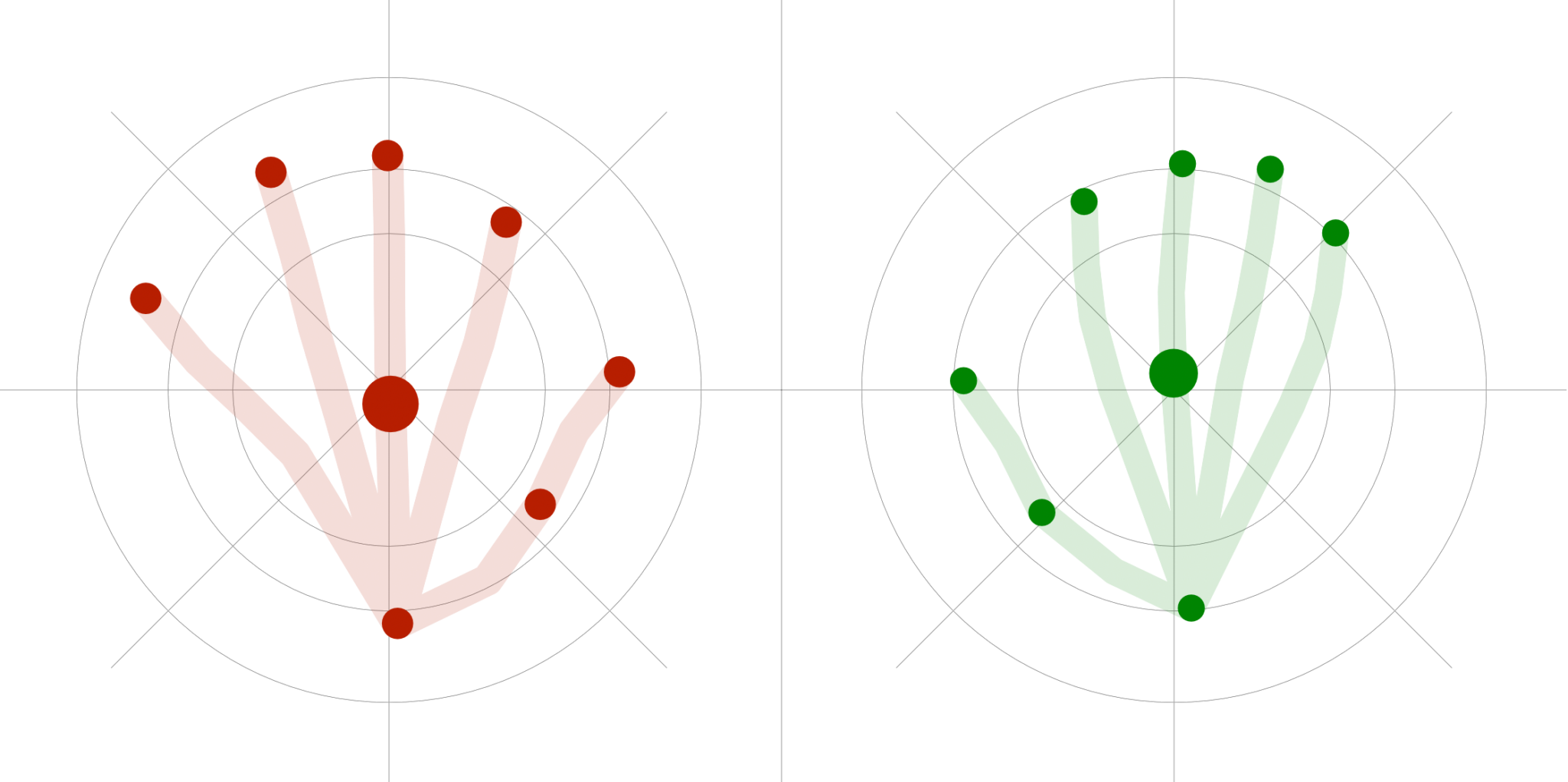
The horizontally flipped video shows the right hand in green and the left hand in red. A background image is used to control the position of the hands and to estimate the rotation angle. Optionally, the camera’s video can be blended in as a background. See also Settings → Camera Controller.
The camera is able to detect the following movements:
- Rotations of the hands (±45°)
- Changes of the distance between the hands and the camera (proportional to the covered area)
- Movements of the hands’ centers (with respect to the circle’s center)
- Angles of the thumbs (0° … 90°)
The mapping between the recognized positions and the musical elements is achieved in the Camera panel. Open the Settings window and select the Camera item to define the desired mapping functions.
To achieve a reliable recognition of movements, good light conditions are essential. Also note that the palms of your hands should be clearly exposed towards the camera.
Neutral Hand Position
The following hand positions leave the musical parameters unchanged:
- The center of the hand (large dot) should be located at the center of the circles
- The finger tips and the wrist should touch the middle circle
- The center line of the hand (from the wrist to the tip of the middle finger) should be vertically oriented
- The thumb is parallel to the other fingers
Default Settings
The default settings are as follows:
- A rotation of the right hand decreases or increases the tempo
- A rotation of the left hand changes the velocity
- A movement of the hand’s center changes the velocities of voices1
- An angled thumb causes the playing of staccato notes
1 The voices are ordered clockwise: Voice 1: top, voice 2: right, voice 3: bottom, voice 4: left.
As with the grand staff, the upper staff corresponds to the right, the lower staff to the left hand.